
10 Tips for Buying a Portable Mining Rig?
Buying a Portable Mining Rig can seem simple when product photos show clean frames, bright fans, and impressive hash-rate figures. In practice, the decision requires careful technical judgment. A rig must match your electricity costs, ventilation, noise tolerance, internet stability, and local regulations. It also needs reliable components that can operate safely for long periods.
Small details matter. Check the mining algorithm, graphics card condition, power supply certification, warranty coverage, and replacement costs. A rig drawing substantial power may need a dedicated circuit, proper grounding, and professional electrical advice. Measure the proposed space before ordering. A compact frame still needs airflow around every fan.
Look beyond the seller’s headline claims. Ask for tested performance, operating temperatures, power consumption, and maintenance records. Compare expected returns with changing coin prices and energy rates. Profit is never guaranteed. Even experienced buyers misjudge heat, fan noise, or repair delays. I have found that a slightly slower rig with efficient parts can be easier to manage than a cheaper, louder machine.
These ten tips will help readers assess a Portable Mining Rig with clearer expectations. They cover hardware quality, operating costs, cooling, security, transport, and long-term support. The goal is not to promise quick earnings. It is to encourage informed, lawful, and practical purchasing decisions. A checklist helps. Careful skepticism helps more.
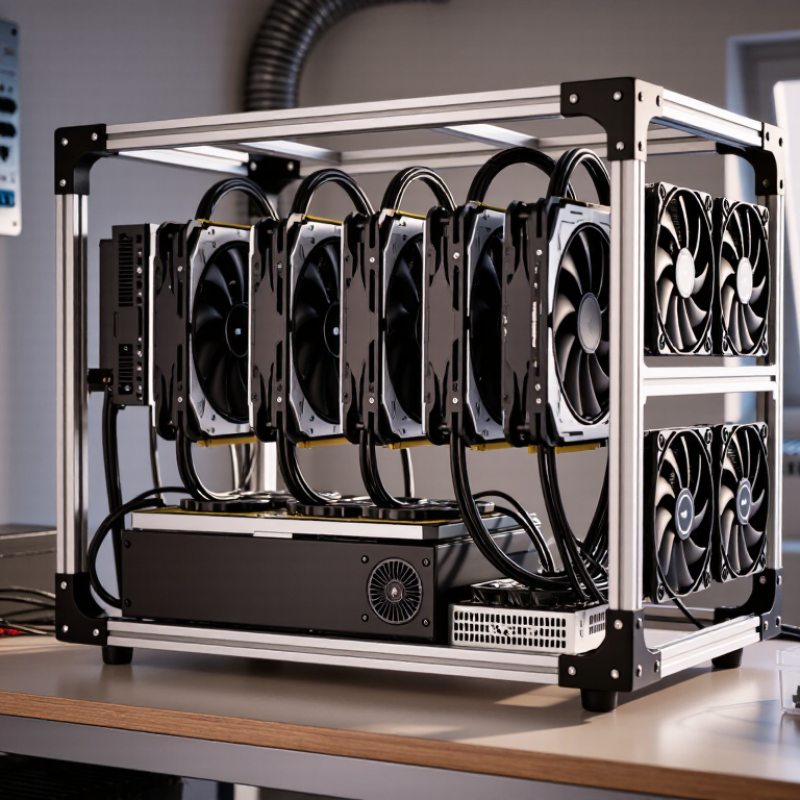
Define the Use Case: Bitcoin ASICs vs. GPU Rigs by Hashrate and J/TH
10 Tips for Buying a Portable Mining Rig: Define the Use Case
Before buying a portable mining rig, define what you intend to mine. Bitcoin ASICs are specialized machines built for one algorithm. Their performance is measured in terahashes per second, or TH/s. Energy efficiency matters just as much. A lower joules-per-terahash figure, or J/TH, usually means less electricity consumed for the same hashrate. A compact ASIC may look portable, but its heat and fan noise can challenge a small room.
GPU rigs offer more flexibility. They can mine different algorithms and may support other computing tasks. Their hashrate is often shown in megahashes per second, or MH/s, so direct comparisons with ASIC figures can mislead buyers. Check efficiency in joules per megahash, or J/MH. Measure actual wall power with a reliable meter, not only the manufacturer’s specification. Small details matter.
I once estimated a rig’s operating cost using its advertised power rating. The real reading was higher after adding the power supply and cooling load. That mistake changed the budget. Leave space around the rig for airflow, and inspect cable quality before daily operation. A portable setup should also tolerate repeated movement without loose connections. Calculate electricity costs using your local rate, expected uptime, and realistic hashrate. Profit estimates can change quickly. Noise, heat, maintenance access, and stable ventilation may matter more than peak performance.
10 Tips for Buying a Portable Mining Rig? - Define the Use Case: Bitcoin ASICs vs. GPU Rigs by Hashrate and J/TH
| Buying Tip | Bitcoin ASIC Use Case | GPU Rig Use Case | Typical Hashrate | Energy Metric | Portability and Setup | Key Buying Check |
|---|---|---|---|---|---|---|
| 1. Define the algorithm | SHA-256 Designed specifically for Bitcoin mining and other SHA-256 networks. |
Multiple algorithms Better suited to algorithms used by GPU-mineable networks, not Bitcoin’s SHA-256 competition. |
ASIC: 100–250 TH/s GPU: usually not competitive for Bitcoin |
ASIC: about 20–35 J/TH GPU J/TH is generally not a meaningful Bitcoin purchasing metric. |
ASICs are purpose-built and usually larger and louder. GPU rigs can be assembled in modular frames. | Confirm the target algorithm before comparing hardware. |
| 2. Compare hashrate correctly | Use terahashes per second (TH/s). A higher TH/s rating increases expected Bitcoin share, assuming similar uptime. | Use the unit appropriate to the selected algorithm, such as MH/s or GH/s. Do not compare GPU hashrate directly with SHA-256 ASIC TH/s. | 1 TH/s = 1,000 GH/s = 1,000,000 MH/s | Hashrate alone does not show profitability; power consumption and network difficulty must also be considered. | Portable systems may sacrifice maximum hashrate for a smaller power supply and enclosure. | Compare like-for-like algorithm and unit. |
| 3. Use J/TH for Bitcoin ASICs | J/TH measures joules used to produce one terahash. Lower is better when electricity prices and uptime are equal. | For GPUs, use watts per unit of hashrate for the selected non-SHA-256 algorithm instead of forcing a J/TH comparison. | Efficient modern ASIC class: approximately 20–25 J/TH Older ASIC class: approximately 30–45+ J/TH |
At 25 J/TH, a 200 TH/s miner uses about 5,000 W before cooling and auxiliary loads. | Lower efficiency creates more heat per unit of Bitcoin hashrate and reduces portability. | Request measured wall-plug power, not only the advertised chip rating. |
| 4. Check total power draw | A 100–250 TH/s Bitcoin ASIC commonly draws roughly 2,500–5,500 W, depending on efficiency and operating mode. | A six-to-eight-GPU rig commonly draws roughly 800–2,000 W, depending on the GPUs, tuning, and algorithm. | Power is measured in watts (W), not TH/s. | Electricity cost per day = power in kW × 24 × electricity price. | High-power ASICs may require dedicated circuits and are rarely suitable for ordinary rooms. | Verify circuit capacity, voltage, breakers, and connector ratings. |
| 5. Evaluate heat output | Nearly all electrical power becomes heat. A 3,000 W ASIC produces approximately 3,000 W of heat during operation. | GPU rigs also convert nearly all consumed electricity into heat, but their load can be distributed across several cards. | 1 W of electrical load is approximately 3.412 BTU/h | 3,000 W produces about 10,236 BTU/h of heat before considering other equipment. | Portable operation still needs ventilation; moving the rig does not remove the heat load. | Size ventilation or extraction for continuous full-load operation. |
| 6. Measure noise tolerance | High-speed fans on Bitcoin ASICs commonly produce approximately 65–85 dBA, depending on model, fan profile, and ambient temperature. | Open-frame GPU rigs often operate around 35–65 dBA, but fan speed rises with temperature and power limits. | dBA is logarithmic; a small numerical increase can sound substantially louder. | Lower power generally makes cooling easier, but fan noise depends on the enclosure and airflow design. | ASICs are generally unsuitable for bedrooms, offices, or shared living areas without acoustic isolation. | Treat manufacturer noise figures as test-condition estimates. |
| 7. Inspect the power supply | Use a power supply rated for continuous operation at the miner’s required voltage and current. | Check total GPU board power, risers, motherboard load, and the power supply’s 12 V capacity. | Leave practical headroom rather than operating continuously at the nameplate limit. | Power supply efficiency affects wall-plug consumption and heat; certification alone does not guarantee system efficiency. | Portable rigs need secure cables and strain relief to prevent connector damage during transport. | Confirm input voltage, plug type, circuit rating, and continuous-load margin. |
| 8. Verify network and control options | Most Bitcoin ASICs use Ethernet and a web-based management interface; Wi-Fi may require an external bridge. | GPU rigs commonly use Ethernet or Wi-Fi through the operating system, mining software, or management platform. | Network bandwidth requirements are low; stable connectivity matters more than speed. | Brief network outages may reduce uptime, while electricity interruptions can cause abrupt shutdowns. | Portable use benefits from remote monitoring, automatic restart, and temperature alerts. | Test remote access and recovery behavior before leaving the rig unattended. |
| 9. Account for operating environment | Dust, humidity, high ambient temperature, and restricted airflow can reduce hashrate or trigger thermal shutdowns. | GPU rigs are also sensitive to dust and temperature; riser cables and open frames require careful handling. | Continuous operation is commonly designed around moderate ambient conditions, not sealed hot spaces. | As ambient temperature rises, cooling power and fan speed generally increase. | Use a dry, clean, ventilated location and avoid placing equipment directly on carpet or near moisture. | Inspect filters, fans, connectors, and temperatures on a regular schedule. |
| 10. Calculate economics before buying | Estimate revenue from hashrate, network difficulty, block subsidy, transaction fees, pool fees, and uptime. | Estimate revenue separately for each supported algorithm because profitability can change significantly over time. | Break-even depends on net revenue per day, purchase cost, resale value, and downtime. | Daily electricity cost = kW × 24 hours × local electricity rate. | Portable hardware may have transport, storage, insurance, and cooling costs that are not shown in simple calculators. | Do not use a fixed profitability estimate without updating network and electricity inputs. |
Related Posts
-
7 Best Portable Mining Rigs for Global Buyers?
-

What is an Asic Mining Shop and How Does it Work?
-
How to Choose the Best Btc Asic Miner for Your Needs?
-
Top 10 Antminer Container Solutions for Global Buyers?
-
Why Choose an Asic Mining Rig for Maximum Profit?
-
2026 Top Asic Mining Shop for Global Buyers Guide?